


Why Your AI Model Disappeared After Restart in GPU Cloud: 'Persistent Storage' Isn't Always Persistent
Many GPU cloud platforms advertise 'persistent storage,' but not all persistence is created equal. This guide explains why AI deployments can still break after a restart, what 'persistent' really means, and how to evaluate whether a GPU platform can truly protect your deployment.
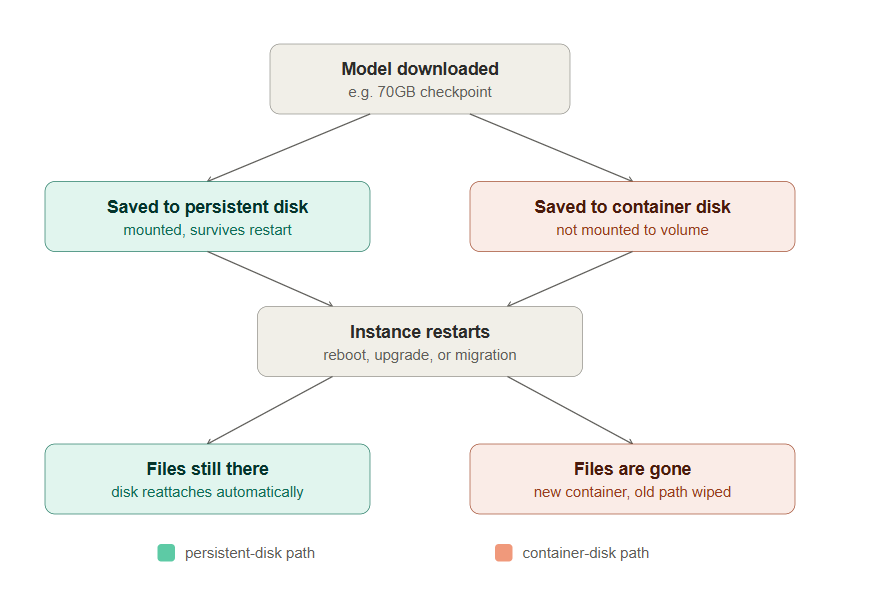
You spend an evening downloading a 70GB model, installing CUDA, getting ComfyUI or vLLM running. Then the server restarts, and it's Model not found. The files were only ever a few hundred gigabytes — what you actually lost was the afternoon it took to set it up. That's the real question behind "does this platform offer persistent storage for AI workloads": not whether storage exists, but whether a restart is a non-event or a disaster for your AI infrastructure.
✅ Takeaway: most "storage failed" complaints aren't storage failures at all — they're a missed mount step mislabeled as one.
The real reasons AI storage fails
Storage for AI workloads usually fails not because the disk broke, but because of the mount step between it and compute. Most GPU cloud platforms run compute and storage as two separate systems joined only by that step — seven recurring patterns account for nearly every case, and none of them require carelessness.
✅ Conclusion: the #1 and #2 patterns below (wrong path, unmounted volume) cause most complaints, and #2 is the single most common docker persistent storage mistake.
| # | What happens | Fix |
|---|---|---|
| 1 | Model saved to /root or /workspace instead of the mounted disk — wiped on restart | Save directly to the mounted path, e.g. /mnt/storage |
| 2 | Volume purchased but never mounted — Docker started without -v | Confirm the mount with df -h before downloading anything |
| 3 | "Delete workspace" removes the volume too, not just the container | Check whether stop and delete are different actions on your platform |
| 4 | Cache paths like ~/.cache/huggingface sit on ephemeral storage | Set HF_HOME=/mnt/storage/huggingface |
| 5 | "Persistent" only guarantees a stop/start cycle, not deletion or a GPU swap | Ask which lifecycle events are actually covered |
| 6 | Network volume remount fails silently, creating an empty directory | Check the storage node directly before assuming data loss |
| 7 | A write hadn't finished flushing to disk before power loss | Treat this as a disk-write risk, not a fake-persistence issue |
| Operation | Does AI data storage survive? |
|---|---|
| Reboot / stop-start | Usually yes |
| Container restart | Depends on the platform |
| Delete or recreate instance | Often no |
| Change GPU / plan | Sometimes no |
Why so many users assume their AI model was saved
A container's local disk and a mounted persistent volume behave identically while running. The difference only shows up after a restart — by which point the download and setup work is already gone. Nothing looks wrong at the time: the commands run, the model loads, there's no error to notice.
✅ Conclusion: if it looks fine while running, that tells you nothing — the only real test is a restart.
This isn't hypothetical: real cloud GPU storage failures
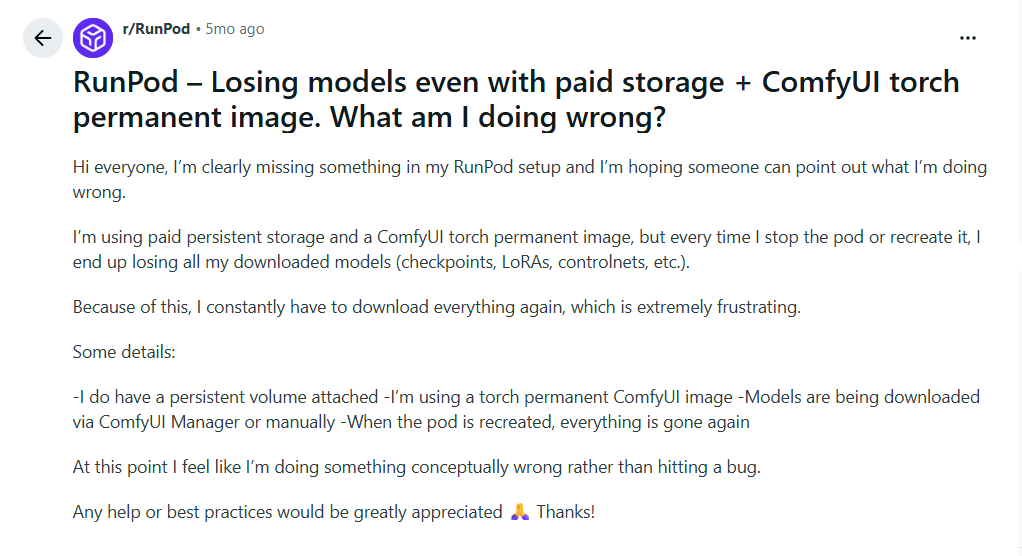
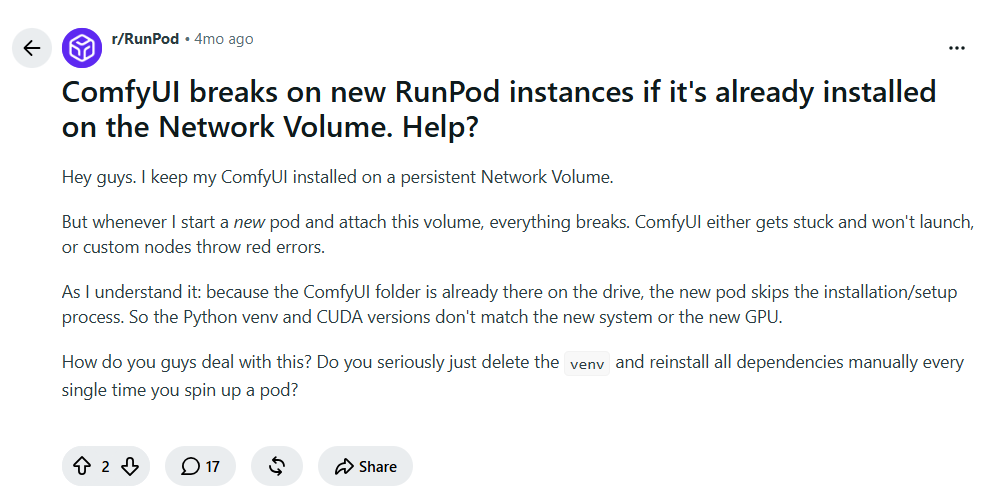
These failures are common enough that "model disappeared after restart" is one of the most common searches among GPU renters — renters write about it constantly, on Reddit and on review sites. Two recent examples from Reddit's r/RunPod:
| Source | What happened |
|---|---|
| Trustpilot, RunPod (1★) | Storage had to be manually matched to compute region; deployment worked, then went unavailable the next day |
| Trustpilot, Vast.ai (1–3★) | Instance unreachable for 6 days with no data access, despite a full month prepaid |
Across 24 one-to-three-star Trustpilot reviews of RunPod and Vast.ai we compiled in July 2026, 12 (50%) cited a storage, persistence, or data-access problem specifically — not billing, not speed, not support tone, but the data itself. This isn't a scientific sample, just the set we reviewed while researching this piece, but it's a signal that storage failures aren't rare here. For more platforms, see our GPU provider comparison.
✅ Conclusion: half of the negative reviews we sampled were a storage complaint, not a billing or speed complaint — this is a data problem, not a tone problem.
Why GPU Mart's storage architecture behaves differently
GPU Mart isn't built on the container-and-volume model described above — every instance is a full virtual or physical machine with its own disk, not a container with a separate volume attached. That rules out failures #1 and #2 by design: there's no separate volume to forget or mount.
✅ Conclusion: choosing infrastructure without a separate volume to mount removes the two most common failure modes before you write a line of code.
The table below reflects GPU Mart's own infrastructure specs, verified July 2026:
| GPU VPS | Dedicated Server | |
|---|---|---|
| Default disk | SSD, 120GB–400GB | SSD |
| Survives reboot / config upgrade | Yes | Yes, expansion adds a new disk |
| Survives plan change | Migration, 7-day retention | Migration, 7-day retention |
| Snapshot / image backup | Not supported | Not supported |
| Backup | Free, every 2–4 weeks | Not included by default |
| Additional storage | SATA from $5/mo | SSD/NVMe/SATA, $39 setup fee |
Plan changes still require migration (GPU Mart keeps your original data for 7 days to do it), and Dedicated Server backup is on you — your own tooling, or GPU Mart's optional Remote Data Center Backup (Windows only, from $30/mo). Uptime and persistence are different guarantees: our infrastructure targets 99.9% uptime, but even in a rare outage, data on a disk isn't at risk the way data in memory is.
GPU Mart's RTX Pro 4000 plan runs $159/month with unlimited bandwidth, versus roughly $175/month for a comparable RunPod Secure Cloud instance, per GPU Mart's own rate card compared against RunPod's published pricing (both checked July 2026). See our cloud vs. dedicated hosting comparison for the full trade-offs.
✅ Conclusion: on GPU Mart, persistent storage for AI is architecture, not an upsell — included by default, not a paid add-on on top of a container-and-volume platform.
How to verify persistent storage yourself
Verify it yourself in under a minute, without trusting a marketing page:
touch test.txt
sudo reboot
ls
If test.txt survived, your disk is genuinely persistent. Run this before any real workload, and confirm your environment and startup scripts come back too, not just the files.
✅ Conclusion: a 3-line test tells you more than any pricing page — run it before you trust a platform with production data.
Will your AI model survive a restart? (30-second check)
Rather not run the command? Check off what's true for your setup — works the same on GPU Mart, RunPod, Vast.ai, or anywhere else.
✅ Conclusion: fewer than 6 of 7 checked means real risk — fix those before you deploy anything you can't afford to lose.
Risk score
0 of 7 checked
Who needs persistent AI storage solutions
This matters most when a restart can't be allowed to cost you hours — in practice, production workloads more than one-off experiments.
| Who | Why it matters |
|---|---|
| AI inference / LLM teams | Running a GPU server for LLM inference means a reboot-triggered outage is a business problem in production, not an inconvenience |
| Image and video creators | ComfyUI, Stable Diffusion, or Flux libraries you don't want to re-download |
| 3D rendering studios | Long jobs need to resume after an interruption, not restart from zero |
| Developers and small teams | Want an AI GPU server with production-grade storage behavior, without hyperscaler prices |
It's a weaker fit for short experiments you'd tear down within the hour, or thousand-GPU distributed training with InfiniBand — different problems. GPU Mart's instances run on SOC 2–certified US data centers with a 99.9% uptime SLA; dedicated hardware means no noisy-neighbor risk on your storage I/O.
✅ Conclusion: if downtime has a dollar cost, persistent-by-default storage is core AI infrastructure, not a nice-to-have.
Frequently asked questions
- What is persistent storage?
- Disk space that keeps your files after the server or container that created them stops or restarts. For AI workloads, that means model weights and environments survive a reboot instead of resetting to empty.
- What's the difference between persistent storage and a persistent volume?
- The first is the general concept — data that survives a restart. The second is one specific implementation: a separate unit you manually attach and mount to a container, common on GPU cloud platforms like RunPod.
- Is container storage persistent?
- Not by default. Container storage usually lives on the container's own ephemeral filesystem and resets when the container is recreated — only storage explicitly mounted from a volume, or a directly attached disk on GPU Mart, survives that.
- Does Docker persistent storage keep AI models after a restart?
- Only if the model was saved to the mounted volume. The most common mistake is downloading models to the container's default path instead of the mount point — see pattern #2 above.
- What storage should I use for AI models?
- For weights and checkpoints, use storage for AI that's directly attached to your compute — an instance disk, not a separate network volume with an extra mount step to get wrong.
- When should I use object storage for AI instead of block storage?
- Object storage (S3-style buckets) fits large training datasets accessed by many jobs at once. Block storage — what GPU Mart's instances use by default — fits a single instance's live model weights and environment.
- My model disappeared after restart — what happened?
- Almost always one of the seven patterns in the table above — most commonly, files written to an ephemeral path or a volume that was never mounted. On GPU Mart, both are ruled out by default.
- How can I prevent AI model loss after restarting a GPU server?
- Save models to the mounted storage path, redirect caches like
HF_HOMEthere too, and run the 30-second reboot test above before any real workload. The checker tool on this page confirms all of it in one pass. - Is GPU Mart a GPU cloud platform like RunPod or Vast.ai?
- No. RunPod and Vast.ai use container-and-volume architecture — the root cause of most failures here. GPU Mart's GPU VPS and Dedicated GPU Server are full machines with directly attached disks, closer to traditional GPU hosting than a shared cloud instance.
- Does GPU Mart support snapshots or backups, and can I add more storage?
- No on-demand snapshot on either product. GPU VPS includes a free backup every 2–4 weeks; Dedicated Server doesn't by default. Both support adding storage later, from $5/month, plus a one-time $39 setup fee on Dedicated Server.
- Does persistent storage survive a plan upgrade on GPU Mart?
- Yes for capacity upgrades on your current instance. Switching plans requires migrating to a new instance, with a 7-day window to move your data.
The bottom line: "persistent storage" is a marketing word until you test it against a restart. Most container-and-volume platforms fail that test not because the disk is bad, but because compute and storage are two systems held together by a mount step nobody audits until it's too late. Skip the architecture that needs auditing — on a directly attached disk, there's nothing to mount and nothing to forget.
GPU hosting built on attached disks, not containers
Ready to stop losing models to a restart?
View GPU VPS plans View GPU Dedicated Servers